
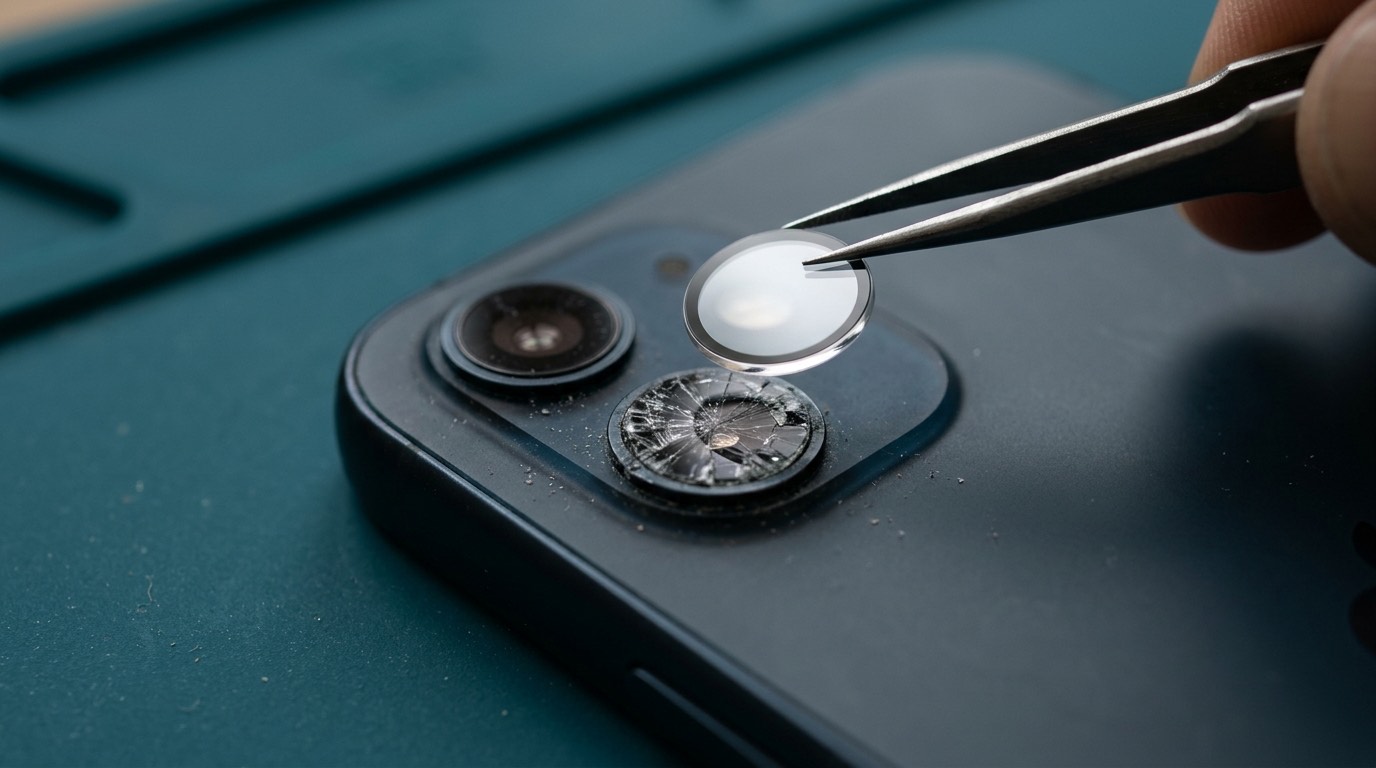
Who needs a camera repair
Most camera repairs start with one of these situations:
- The lens glass is cracked. The phone was dropped on its back or something hard in a bag scratched or chipped the small glass cover over the camera. Photos look hazy, have flare, or show a visible line.
- Photos are blurry and won’t focus. The camera hunts for focus, or everything is soft even in good light.
- The camera shakes, buzzes or clicks. On phones with optical image stabilization (OIS), the stabilizer can be damaged by impact or vibration.
- The camera app shows a black screen for one or all lenses.
- One lens doesn’t work. The telephoto or ultra-wide doesn’t switch, or switching shows a black or frozen image.
- The front camera fails, sometimes along with Face ID on iPhone.
- The flashlight doesn’t work, or the flash works but the camera app says it’s unavailable.
Camera problems matter more than they used to. Your phone camera is probably also your document scanner, your QR reader, your video calling camera and your record of everything that matters. A cracked lens can usually be fixed quickly and at modest cost, so it’s worth looking at sooner rather than later.
Symptoms and likely causes
| Symptom | Likely cause | Usual repair |
|---|---|---|
| Haze, flare or a line on every photo from one lens | Cracked or scratched lens cover glass | Lens glass replacement |
| Photos blurry, focus hunting | Damaged autofocus, debris or moisture inside the lens, or cracked cover glass | Lens glass first; camera module if focus is damaged |
| Camera image shakes or vibrates, buzzing sound | Damaged optical image stabilization | Camera module replacement |
| Black screen in camera app | Failed camera module, damaged connector, software | Software check, reseat, then module |
| Telephoto or ultra-wide won’t switch | One sensor in the module failed | Module replacement |
| Spots in every photo | Dust inside the lens or a damaged sensor | Cleaning where possible, otherwise module |
| Flashlight greyed out | Flash LED failure, or the phone is too hot, or the camera process crashed | Restart and cool down first; then flash flex repair |
| Front camera dark and Face ID unavailable (iPhone) | Damage to the front sensor assembly | Assessment; Face ID repair options are limited |
What causes camera damage
- Drops onto the back of the phone. The camera bump is the highest point on the back and often takes the first impact.
- Vibration. Mounting a phone on a motorcycle or a vibrating dashboard mount can damage optical image stabilization over time. Apple has published guidance about this for iPhone.
- Moisture. Water or condensation inside the lens causes fogging and focus problems.
- Pressure. A phone squeezed in a bag can crack the lens glass from below.
- Previous repairs. Dust that got inside during a poorly sealed repair can show as spots in photos.
Try this before booking
- Clean the lens with a microfibre cloth. Fingerprints and pocket grime cause a lot of "blurry camera" reports.
- Remove the case. Some cases block the flash or the edge of the ultra-wide lens.
- Restart the phone and try the camera again.
- Test all lenses by switching between 0.5x, 1x, 2x or 3x and the front camera.
- Let a hot phone cool down. Phones disable the flash when they’re too warm.
- Update the phone. Camera bugs are sometimes fixed in software updates.
How we diagnose camera problems
- Inspect the lens covers under magnification for cracks, chips and scratches.
- Test each camera at each zoom level, in photo and video, with and without stabilization.
- Test focus at close and far distances.
- Listen and look for stabilization faults, such as shaking preview or a buzzing sound.
- Check Face ID and the front camera on iPhone, since they share space at the top of the phone.
- Check software and settings, including third-party camera apps and restrictions.
Camera repair options
Camera lens glass replacement
The camera lens cover is a small piece of glass or sapphire glued into the camera bump. When only the cover is cracked, and the camera module underneath is fine, we can remove the broken glass, clean the area and fit a new cover. On many models this doesn’t require opening the phone. It is usually the quickest and most affordable camera repair.
The catch: if the crack has let dust or moisture in, or if the glass shattered inward, the camera module may also be scratched. We check for that before quoting.
Rear camera module replacement
If a sensor, autofocus or stabilization unit is damaged, the camera module needs replacing. On most phones the rear cameras come as one assembly, so a fault in one lens means replacing the whole module.
On recent iPhones, camera modules are paired to the phone’s logic board. A replacement module can show a "Unknown Part" notice and, on some models, some features may be limited unless the part is calibrated through Apple’s system. We’ll tell you what to expect on your model. On Pixel and Samsung, replacement modules generally work fully, but some camera software features rely on calibration data.
Front camera replacement
Front cameras are smaller and usually less expensive to replace. On iPhones with Face ID, the front camera sits next to the Face ID sensors, and parts of the Face ID system can’t be replaced independently outside Apple’s own process. If Face ID is damaged, we’ll explain your options honestly, which sometimes means Apple is the better route.
Flashlight repair
The flash LED usually sits on a small flex cable. If the LED or its flex is damaged, it can be replaced. On some phones it shares a flex with the microphones or the power button.
Blurry camera troubleshooting
If focus is fine at a distance but poor close up, the phone may be switching to the wrong lens or using macro mode. If focus is poor everywhere, the cause is physical: cracked glass, moisture, debris or a damaged module. We work through these in order, so you only pay for the part that fixes it.
What affects camera repair cost and turnaround
- Lens glass only or full module. Glass is usually far less expensive.
- Model. Pro and Ultra models with multiple high-end cameras have more expensive modules.
- Whether the phone has to be opened. Opening an Android phone means removing and resealing the back glass.
- Part pairing on recent iPhones.
- Additional damage, such as cracked back glass at the same time.
Lens glass replacements on common models can often be done quickly once the part is available. Module replacements take longer, especially on phones that open through the back glass. Diagnostic fee: [DIAGNOSTIC FEE].
Camera repair notes by brand
iPhone
iPhone Pro models have three rear cameras plus a LiDAR scanner in one assembly. The lens covers are separate pieces of sapphire glass, which resist scratches well but can crack on impact. On iPhone 12 and later, camera modules are serialized to the phone, so a replacement camera can show a parts notice. The iPhone camera bump also protects the lenses less than people think: a case with a raised lip around the cameras is the best protection.
Samsung Galaxy
Galaxy S Ultra models have several cameras, including periscope telephoto lenses, each in its own housing with its own cover glass. This means a crack over one lens can often be fixed without touching the others. On Galaxy A models, the rear camera lens cover is often a single piece covering all lenses.
Google Pixel
Pixel 6 and later models put the rear cameras in a horizontal camera bar that spans the back of the phone. The bar’s glass can crack on its own, separate from the back glass. Pixel photo processing relies heavily on software, so we check for camera app issues as well as hardware.
Motorola and OnePlus
Most Motorola and OnePlus phones use a single camera island with one cover glass. Some models use a camera cover that is part of the back panel or back glass, which means replacing the back to fix a cracked lens.
When a camera repair may not be worth it
We’ll be honest if a camera repair doesn’t make sense. That’s usually when:
- The phone’s value is low and the camera module costs a large part of it.
- The phone has other significant damage, such as a cracked screen and a worn battery, and the total would approach the cost of a newer phone.
- The camera module for your model isn’t available in a quality we trust.
- The fault is in Face ID hardware on an iPhone, where independent repair options are limited.
In those cases we’ll suggest alternatives, which might be repairing only the part you care most about, or not repairing at all.
Fogged lenses and cold weather
In a Halifax winter, it’s common for a phone to fog up inside the camera lens after coming indoors from the cold. Warm, humid indoor air condenses on cold surfaces, including the inside of the lens assembly if the seals are worn or the cover glass is cracked. Usually the fog clears within an hour as the phone warms to room temperature. If fog appears often, stays for a long time or leaves spots on photos, moisture is getting in, which usually means cracked lens glass or a failed seal. Left alone, repeated condensation can lead to corrosion on the camera connector. Let the phone warm up gradually in a pocket rather than next to a heater, and have the lens inspected if it keeps happening.
Protecting your phone camera
- Use a case with a raised lip around the camera bump.
- Consider a camera lens protector, but choose a good one. Cheap lens protectors can cause flare and soft photos, especially at night.
- Avoid vibrating mounts, particularly on motorcycles and scooters, or use a mount with vibration dampening.
- Keep the phone out of pockets with keys and coins. Hard metal can chip lens glass.
- Wipe the lens before important photos. It sounds obvious, but a fingerprint is the most common cause of hazy photos.
Supported devices
We repair cameras and lens glass on most iPhone models from iPhone 8 onward, Samsung Galaxy S, A and Note models, Google Pixel phones from the Pixel 6 onward, including the camera bar models, and many Motorola and OnePlus phones. Availability of camera modules for the newest flagships can be limited; ask with your exact model.
Before your appointment
- Back up the phone. Camera repairs don’t erase data, but backups are always wise.
- Note which lenses and modes are affected.
- Take a sample photo that shows the problem, if you can, and attach it to your quote request.
- Remove the case so we can see the camera bump.
- Know your passcode for testing afterwards.
Warranty and parts
Camera repair warranty: [CONFIRMED WARRANTY]. This covers defects in the part we fit, such as focus failure or a dead sensor. It doesn’t cover new drops, scratches, liquid damage or vibration damage after the repair. We’ll tell you whether the part is original or a third-party equivalent.
Booking a camera repair
- Request a quote with your model, which camera is affected and, ideally, a photo of the lens and a sample picture.
- We reply with the likely repair, a price and timing.
- Approve and book. You can [REPAIR MODEL: in-store / mobile repair / mail-in / combination].
- We repair and test every camera and the flash before returning the phone.
Frequently asked questions about camera repair
Can you replace just the camera lens glass?
Yes, on most models, if the camera underneath isn’t damaged. It’s usually the most affordable camera repair.
Why is my camera shaking or making a buzzing noise?
That’s usually damaged optical image stabilization. It can follow a drop or long exposure to vibration, such as a motorcycle mount. The fix is normally a camera module replacement.
My camera app shows a black screen. Is the camera broken?
Not always. Restart the phone and try a different camera app first. If one lens or all of them stay black, the module or its connector is likely damaged.
Will Face ID still work after a front camera repair?
Face ID uses separate sensors near the front camera. We handle those parts carefully, but if Face ID was damaged in the drop, it may not be repairable outside Apple’s own service. We check before starting.
Will my iPhone show a message after a camera replacement?
On recent iPhones, a replacement camera may show an "Unknown Part" notice. We explain beforehand.
Can a scratched camera lens be polished?
Small scratches on the cover glass can’t be polished away safely without affecting image quality. Replacing the cover glass is the reliable fix.