
Who needs a charging port repair
You may need a charging port repair if your phone:
- Only charges when the cable is held at a certain angle.
- Charges, then stops, then starts again (you hear the connection sound repeatedly).
- Won’t charge with any cable or charger, but works on a wireless charger.
- Shows a "moisture detected" or "liquid detected" warning even though it’s dry.
- Has a cable that falls out easily or doesn’t click into place.
- Isn’t recognized by your computer when connected, even though it charges.
- Charges very slowly even with a fast charger.
Charging ports take more wear than almost any other part of a phone. You plug in and unplug a cable one or more times a day for years, and the port sits open to whatever is in your pocket or bag. In a Nova Scotia winter that includes grit, salt residue from mittens and coat pockets, and condensation when you come in from the cold.
Common causes of charging problems
| Cause | How it shows up | Typical fix |
|---|---|---|
| Lint and debris packed into the port | Cable doesn’t seat fully, charges only at an angle | Professional port cleaning |
| Worn or bent pins | Intermittent charging, cable loose even after cleaning | Port replacement |
| Corrosion from moisture | "Moisture detected" warnings, green or white residue | Cleaning; replacement if pins are damaged |
| Damaged cable or charger | Works with a different cable | No repair needed: replace the cable |
| Worn or failed battery | Charges slowly or percentage stuck | Battery replacement |
| Charging circuit fault on the board | No charging at all with any cable, often after liquid or a power surge | Board-level diagnosis |
| Software | Charging paused at 80% by optimized charging, or a bug after an update | Settings change or software fix |
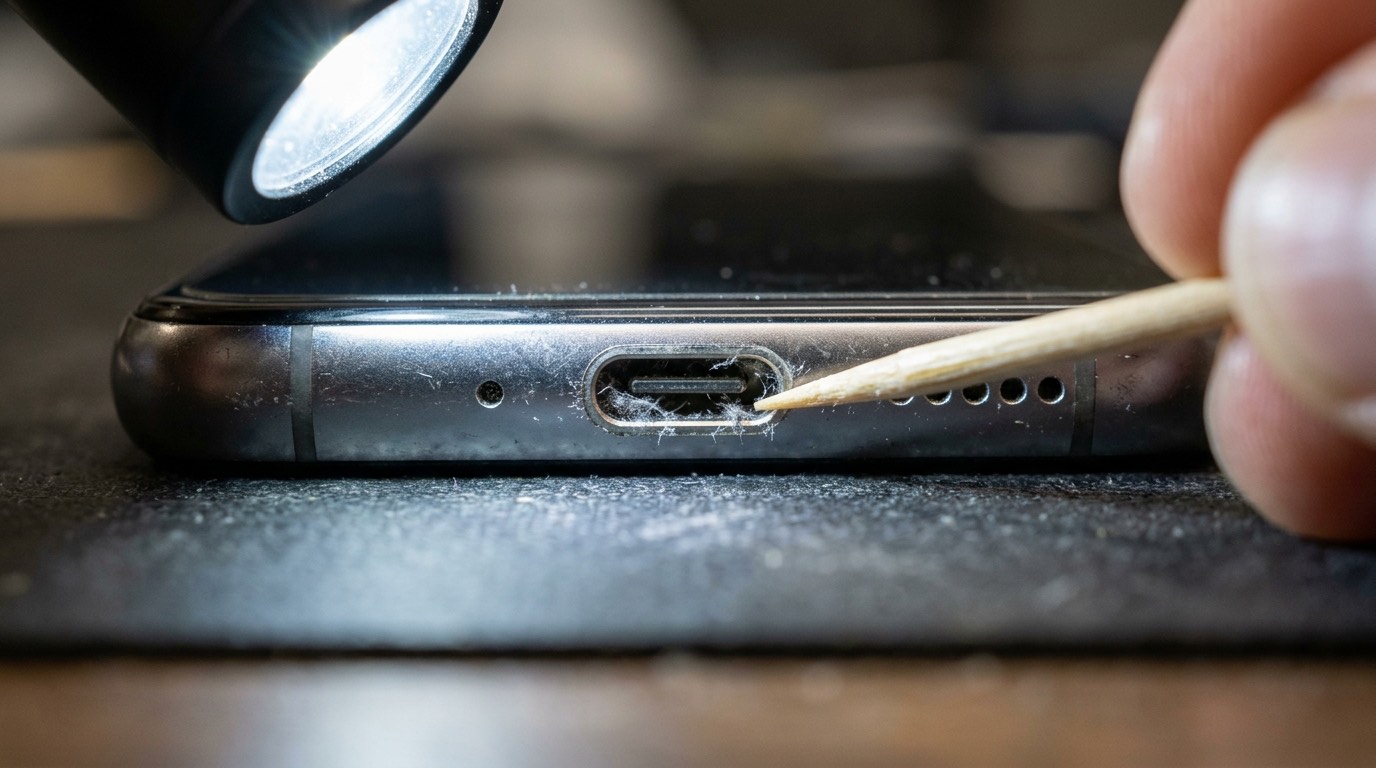
Before booking, try this: use a different cable and a different charger, ideally ones that you know work with another phone. Restart the phone. Check whether optimized charging is holding the battery at 80%. If none of that helps, look into the port with a torch. If you can see grey fluff packed at the bottom, that is probably your problem.
Please don’t clean the port with metal
The most common way people damage a charging port is by trying to clean it with a paperclip, a pin, or a SIM ejector tool. Metal can short the pins, which are live when the battery is connected, and it can bend or scratch the tiny contacts. Compressed air can push debris deeper and, if the can is tilted, spray liquid propellant into the port. If you want to try yourself, power the phone off and use a wooden toothpick very gently. Otherwise, let us clean it: it’s quick and often solves the problem without replacing anything.
How we diagnose charging problems
- Visual inspection under magnification. We look for debris, bent pins, corrosion and damage to the port housing.
- Careful cleaning with non-conductive tools and, where needed, isopropyl alcohol.
- Current measurement. A USB meter shows how much power the phone actually draws. Normal draw with slow charging suggests a worn battery; zero draw suggests the port, the flex cable or the charging circuit.
- Data connection test. A port that charges but won’t connect to a computer may have damaged data pins.
- Wireless charging comparison. If wireless charging works but cable charging doesn’t, the battery and charging circuit are probably fine, which points to the port.
- Liquid indicator check if there are moisture warnings.
How a charging port replacement works
Charging ports are built into phones in a few different ways, and that has a big effect on the price and complexity.
Port on a flex cable (most iPhones)
On most iPhones the Lightning or USB-C port sits on a flex cable that also carries the microphones and sometimes the antenna connections. The repair means removing the screen, the battery, the Taptic Engine and the loudspeaker to reach it. It is a longer job than it sounds, but it replaces the whole flex, including the bottom microphones.
Port on a small sub-board (most Samsung, Pixel, Motorola and OnePlus phones)
Most Android phones put the USB-C port on a small daughter board at the bottom of the phone, connected to the main board by a flex cable. Replacement means opening the back, removing a cover plate and swapping the board. This is usually one of the more affordable repairs on Android phones.
Port soldered to the main board
On some phones the USB-C port is soldered directly to the main logic board. Replacing it means micro-soldering: removing the old port with hot air and soldering a new one in place. It is precise work, it carries more risk and it isn’t possible on every model. We’ll say clearly if your phone is built this way.
After the repair we test charging, fast charging, data connection to a computer, the microphones on the same flex and, for phones with sub-boards, the loudspeaker and antenna connection.
Wireless charging diagnostics
If wireless charging stopped working but cable charging still works, the cause is usually one of these:
- A thick case, magnetic wallet or metal plate blocking the coil. Try without the case first.
- The phone isn’t positioned on the coil. Wireless charging is fussy about alignment.
- A damaged wireless charging coil, usually after a drop that also cracked the back glass. The coil sits under the back glass on most phones, so a back glass repair is often done at the same time.
- A faulty charger. Test with another wireless pad.
- A board fault in the wireless charging circuit.
SIM card reader repair
SIM faults show up as "No SIM", "Invalid SIM" or a signal that keeps dropping. Before booking, check that the SIM card itself works in another phone and that your carrier hasn’t moved you to an eSIM. If the SIM works elsewhere, the fault may be bent contacts in the SIM reader, a damaged tray, or a fault on the board. On many phones the SIM reader is soldered to the board; on some it’s on a separate flex. We’ll tell you which applies to your model.
Wi-Fi and Bluetooth troubleshooting
Wi-Fi and Bluetooth problems are usually software: a corrupted network profile, a router setting or a bug after an update. We start by resetting network settings (with your permission, because it removes saved Wi-Fi passwords) and testing on a known good network. If the problem persists, the cause can be a damaged antenna cable or a board-level fault, often after a drop or liquid damage. Wi-Fi options greyed out in settings usually point to a hardware fault.
What affects cost and turnaround
- How the port is built in: sub-board (quickest), flex cable (more disassembly) or soldered to the board (micro-soldering).
- Model and part availability.
- Whether cleaning solves it. If it does, you only pay for the cleaning.
- Additional damage such as corrosion on the board or a damaged battery.
Port cleaning is usually quick. Port replacement on a sub-board phone often takes an hour or less with the part in stock; iPhone flex replacements take longer. Board-level port work needs more time. Diagnostic fee: [DIAGNOSTIC FEE].
Charging port differences by brand
iPhone
iPhone 5 through iPhone 14 models use Apple’s Lightning connector; iPhone 15 and later use USB-C. Lightning ports have contacts on the cable, not in the port, so worn Lightning ports are less common than debris-packed ones. USB-C ports have a small centre tongue inside the port that can bend or snap if a cable is pulled out at an angle. On every iPhone, the port is part of a flex cable that also carries the bottom microphones, so a port replacement often fixes muffled calls as well.
Samsung Galaxy
Most Galaxy S and A models put the USB-C port on a separate sub-board. Samsung’s moisture detection is sensitive, and a "moisture detected" warning that won’t clear is one of the most common reasons Galaxy owners contact us. The fix is often cleaning, but corrosion on the pins means the sub-board is replaced.
Google Pixel, Motorola and OnePlus
These phones mostly use a USB-C sub-board or a port on a bottom flex. Some budget Motorola models have the port soldered to the main board. OnePlus phones that support very fast charging need a port and cable that support the full charging protocol, so we test charging speed after any repair.
Looking after your charging port
A few habits make a port last much longer:
- Pull the plug, not the cable. Grip the connector itself when unplugging, and pull it straight out rather than at an angle.
- Don’t use the phone hard while it’s plugged in with the cable bent sharply, such as gaming in bed with the cable under tension.
- Keep the port out of lint. If you carry your phone in a pocket, put it in upside down now and then, or use a case with a port cover if you work outdoors.
- Use good cables. Frayed cables and cheap connectors can damage pins over time.
- Let a cold phone warm up before plugging it in after a long time outside. Condensation forms inside a cold phone brought into a warm room, and charging a damp port can cause corrosion.
- Use wireless charging for overnight charging if your phone supports it. It reduces daily wear on the port.
Supported devices
We repair charging ports on iPhone models with Lightning and USB-C ports, Samsung Galaxy S, A and Note models, Google Pixel phones, and most Motorola and OnePlus phones with USB-C. Micro-USB ports on older phones can often be repaired too. Ask with your exact model and we’ll confirm.
Before your appointment
- Try a different cable and charger first; it can save you a trip.
- Don’t put metal into the port.
- If you saw a moisture warning, don’t force charging. Let the phone dry, and if the warning stays, see water damage repair.
- Back up if you can, and know your passcode for testing afterwards.
- Bring the cable and charger you normally use, so we can test those too.
Warranty and parts
Charging port warranty: [CONFIRMED WARRANTY]. This covers defects in the part we fitted. It doesn’t cover new physical damage, liquid exposure or damage from bent or faulty cables after the repair.
Booking a charging port repair
- Request a quote with your model, a description of what happens when you plug in, and whether wireless charging works.
- We reply with the likely fix. If we think cleaning will solve it, we tell you.
- Approve and book. You can [REPAIR MODEL: in-store / mobile repair / mail-in / combination].
- We clean or replace, test and return the phone.
Call (902) 220-3541 with questions.
Frequently asked questions about charging port repair
My phone only charges at an angle. Is the port broken?
Not necessarily. The most common cause is lint packed into the bottom of the port, which stops the cable seating fully. A professional cleaning often fixes it. If the pins are worn or bent, the port needs replacing.
Can a charging port be cleaned instead of replaced?
Yes, and we always check that first. Many "broken" ports just need cleaning.
My phone says "moisture detected" but it’s dry. What should I do?
Unplug it, let it dry for a few hours with the port facing down, and try again. If the warning keeps appearing, there may be corrosion or debris in the port. Don’t override the warning to charge a wet port, because that can corrode the pins.
Is it worth replacing the port on an older phone?
On Android phones with a separate charging board, port replacement is usually affordable and worthwhile. On phones where the port is soldered to the board, the repair costs more and the decision depends on the phone’s value.
Will replacing the charging port fix my microphone too?
On iPhones, the bottom microphones are on the same flex as the port, so they are replaced at the same time. On many Android phones, the main microphone is on the charging sub-board too.
Why does my phone charge slowly even with a fast charger?
Common causes are a cable that doesn’t support fast charging, debris in the port, a worn battery, or a phone that is warm and limiting charging speed. We test each of these.